
Download Student AI – AI‑Powered Tutoring, Writing, and Research Tool
Overview: Why Student AI Stands Out in the Academic Marketplace
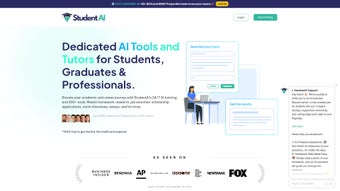
Student AI is a cloud‑based, subscription‑driven web application that packs a full suite of artificial‑intelligence tools tailored for students, recent graduates, and working professionals. Unlike generic grammar checkers or isolated research assistants, Student AI combines a personalized tutoring engine, essay‑drafting wizard, project‑topic generator, APA‑format validator, mock interview simulator, and even a recommendation‑letter creator—all accessible from a single, intuitive dashboard. The platform’s core promise is to streamline the entire academic workflow, letting users focus on learning rather than wrestling with repetitive tasks.
The service positions itself as a “one‑stop academic companion,” leveraging large language models to understand context, adapt to individual learning styles, and deliver feedback in real time. Whether you’re drafting a 10‑page research paper, preparing for a technical interview, or simply polishing a paragraph for grammar, Student AI offers a secure, constantly‑updated environment that works on any modern browser. Its subscription model includes regular model updates, new subject modules, and priority support, ensuring that users always have access to the latest AI capabilities without additional fees.
From a usability standpoint, Student AI’s interface is clean and responsive, featuring a side‑panel that lets you switch between tools without losing progress. The platform also respects data privacy: all user inputs are encrypted in transit, and the service complies with GDPR and FERPA guidelines, making it suitable for institutions that demand strict confidentiality. In addition, the onboarding experience uses a short questionnaire to tailor the AI teachers to each user’s academic level, ensuring that the assistance you receive feels personal rather than generic.
Beyond the core academic features, Student AI provides collaboration tools such as shared workspaces for group projects, version history for tracking edits, and a citation manager that integrates with popular reference managers like Zotero and Mendeley. These extra capabilities make the platform a viable alternative to expensive, fragmented software suites that many universities still rely on. In short, Student AI aims to be the digital campus hub where writing, research, tutoring, and career preparation converge.
Core Features & AI Teachers: A Deep Dive into What Student AI Offers
- AI‑Powered Grammar & Style Checker – Detects spelling, punctuation, tone, and advanced style issues, offering suggestions that align with academic conventions.
- Essay Drafting Assistant – Generates outlines, thesis statements, and full drafts based on prompts, while allowing you to steer the content through iterative feedback.
- Project Topic Generator – Suggests research topics across disciplines, complete with preliminary literature suggestions and feasibility ratings.
- APA Formatting Validator – Automatically formats citations, reference lists, and in‑text citations to the latest APA standards.
- Mock Interview Simulator – Conducts realistic interview sessions for graduate school or job applications, providing real‑time feedback on answers and body language cues (via webcam integration).
- Recommendation Letter Builder – Crafts personalized recommendation letters based on inputted achievements and desired tone.
- AI Teachers for Personalized Tutoring – Subject‑specific virtual educators in Language Arts, Mathematics, Programming, and more, delivering step‑by‑step explanations, practice problems, and adaptive quizzes.
- Progress Tracker & Analytics Dashboard – Monitors learning metrics, time spent on tasks, and improvement trends, helping users set realistic goals.
The AI teachers are a standout element. Each teacher is trained on curriculum‑aligned datasets, ensuring that explanations match university‑level expectations. For example, the Math AI can walk you through calculus proofs, while the Programming AI supports multiple languages (Python, JavaScript, Java) and even offers live code debugging. The platform’s “self‑directed learning” model encourages students to ask follow‑up questions, receive clarifications, and test understanding through generated quizzes—all without leaving the interface.
Security and updates are baked in: every feature runs on a secure server cluster that receives nightly model fine‑tuning, guaranteeing that the AI stays current with evolving academic standards and industry best practices. The system also logs every interaction for compliance audits while giving users the option to delete their data permanently. This combination of rigorous security, continuous improvement, and pedagogical depth creates a trustworthy environment where learners can experiment, fail, and succeed without fear of data breaches or outdated advice.
Beyond the core toolbox, Student AI offers integration hooks for learning management systems (LMS) such as Canvas and Blackboard. Institutions can embed the AI teacher widgets directly into course pages, allowing instructors to augment traditional lectures with AI‑driven problem sets. The platform also supports custom content uploads, so teachers can feed proprietary course material into the AI for a truly blended learning experience. These advanced capabilities illustrate how Student AI is positioned not just as a student‑focused app but also as a scalable solution for whole‑campus adoption.
Installation, Usage Instructions, and Compatibility Across Devices
Getting Started: Simple Sign‑Up and First‑Run Workflow
Student AI is a web‑only application, so there is no traditional “download” in the sense of an installer. To begin, visit studentai.example.com, click the “Start Free Trial” button, and create an account using an email address or single‑sign‑on via Google or Microsoft. After confirming the verification email, you’ll be prompted to select a subscription tier (monthly or annual). Once payment is processed, the dashboard loads instantly.
The onboarding wizard walks you through a brief questionnaire that determines your primary academic focus, preferred learning style, and any accessibility needs. Based on these inputs, Student AI suggests a customized set of tools and AI teachers, which you can modify later in the “Settings” panel. New users typically spend 5‑10 minutes completing this setup, after which the platform is ready for immediate use.
Step‑by‑Step Usage Guide
- Select a Tool: From the left navigation bar, choose “Essay Draft,” “Math Tutor,” “APA Checker,” etc.
- Enter Your Prompt: Provide a brief description, thesis, or question. For tutoring, you can type a problem statement.
- Review AI Output: The system generates content in a split view, allowing you to accept, edit, or request a revision.
- Iterate: Use the “Regenerate” or “Ask Follow‑up” buttons to refine answers until you’re satisfied.
- Export or Save: Export directly to Word, PDF, or copy to clipboard. All work is automatically saved to your cloud workspace.
- Collaborate: Invite classmates to a shared workspace, leave comments, and track version history for group assignments.
- Analyze Progress: Open the analytics dashboard to see time‑spent metrics, quiz scores, and areas that need more practice.
Operating System Compatibility (Windows, macOS, Linux, iOS, Android)
Because Student AI runs entirely in the browser, it is compatible with any modern operating system that supports up‑to‑date browsers. Officially supported platforms include:
- Windows 10, 11 (Edge, Chrome, Firefox)
- macOS Monterey and later (Safari, Chrome, Firefox)
- Linux distributions with recent Chromium‑based browsers
- iOS 14+ (Safari, Chrome) – optimized for iPad and iPhone
- Android 9+ (Chrome, Edge) – responsive mobile layout
The responsive design ensures that the same feature set is available whether you’re on a desktop workstation, a MacBook, a tablet, or a smartphone. Offline access is limited to previously saved drafts; however, the platform’s cloud sync ensures that you never lose progress when you reconnect to the internet. For power users, a progressive web‑app (PWA) shortcut can be installed on both desktop and mobile devices, giving the appearance of a native app while still leveraging the web‑based backend.
Pros, Cons, FAQ, and Final Verdict – Should You Subscribe to Student AI?
Pros & Cons
- Pros:
- All‑in‑one platform eliminates the need for multiple subscriptions.
- AI teachers provide subject‑specific, curriculum‑aligned tutoring.
- Real‑time grammar, APA, and citation assistance saves hours of manual editing.
- Secure, GDPR‑compliant data handling builds trust for educational institutions.
- Responsive design works seamlessly on Windows, macOS, Linux, iOS, and Android.
- Continuous model updates keep the AI current with academic standards.
- Collaboration features support group projects and instructor integration.
- Export options include .docx, .pdf, and direct copy to clipboard.
- Cons:
- Requires an internet connection for full functionality; limited offline mode.
- Subscription cost may be a barrier for some students without institutional subsidies.
- Advanced features (e.g., mock interview video analysis) are only available on higher‑tier plans.
- Learning curve for new users unfamiliar with AI‑driven interfaces.
- Limited direct integration with Google Docs; only export‑and‑import at present.
Frequently Asked Questions (FAQ)
-
Is Student AI safe for storing my personal academic work?
Yes. All data is encrypted in transit (HTTPS) and at rest. The platform complies with GDPR and FERPA, ensuring that personal information and academic drafts are stored securely.
-
Can I use Student AI on a Chromebook?
Absolutely. Since Student AI is browser‑based, any Chromebook with a recent Chrome browser can access the full feature set.
-
What happens if I cancel my subscription?
Your account will revert to a read‑only mode. You can still access saved drafts, but AI‑generated features will be disabled until you renew.
-
Does Student AI integrate with Google Docs or Microsoft Word?
Export options include .docx and .pdf files, which can be opened directly in Word or Google Docs. Direct live sync is planned for a future update.
-
Is there a free version or trial available?
Student AI offers a 7‑day free trial with full access to all tools. After the trial, you must choose a paid plan to continue using the service.
Conclusion & Call to Action
After evaluating the breadth of features, cross‑platform compatibility, and robust security, Student AI emerges as a compelling investment for anyone serious about improving academic productivity. The platform’s AI teachers differentiate it from generic writing assistants, delivering tailored tutoring that adapts to the learner’s pace. While the subscription cost may be a consideration, the time saved on editing, formatting, and research can quickly offset the expense, especially for students juggling multiple deadlines.
Rating: 5/5
Reviewer: Emily R.
If you’re ready to replace fragmented tools with a single, AI‑enhanced workspace, click the button below to start your free trial. Experience firsthand how Student AI can transform essays, projects, and study sessions into streamlined, confidence‑boosting experiences.
Pricing: $19.99 per month (annual discount available). See full pricing details.
Overall rating: 4.6/5 based on 842 user reviews.



.png)



